You already have a website on Wix, WordPress or another builder. You list on Airbnb or Booking.com. You want guests to see real availability on your own site, and to book there, without rebuilding everything.
Below is how it works in any builder, and how it compares with the builder's own options. Details about other tools come from their own pages, checked on 10 November 2026.
Website builder or a full booking website?
| You already have… | What you need |
|---|---|
| A Wix, WordPress, Squarespace or Webflow site you like | A booking widget you paste in. Keep the site. |
| Only Airbnb, Booking.com and WhatsApp or social media | A booking link is often enough. Share it; there is nothing to embed. |
| No site yet, and you want one built together with your rental software | Start with a Bookinghook booking link, so guests can book and pay today. Add the widget once your site is live in any builder. |
What the Bookinghook widget does on your site
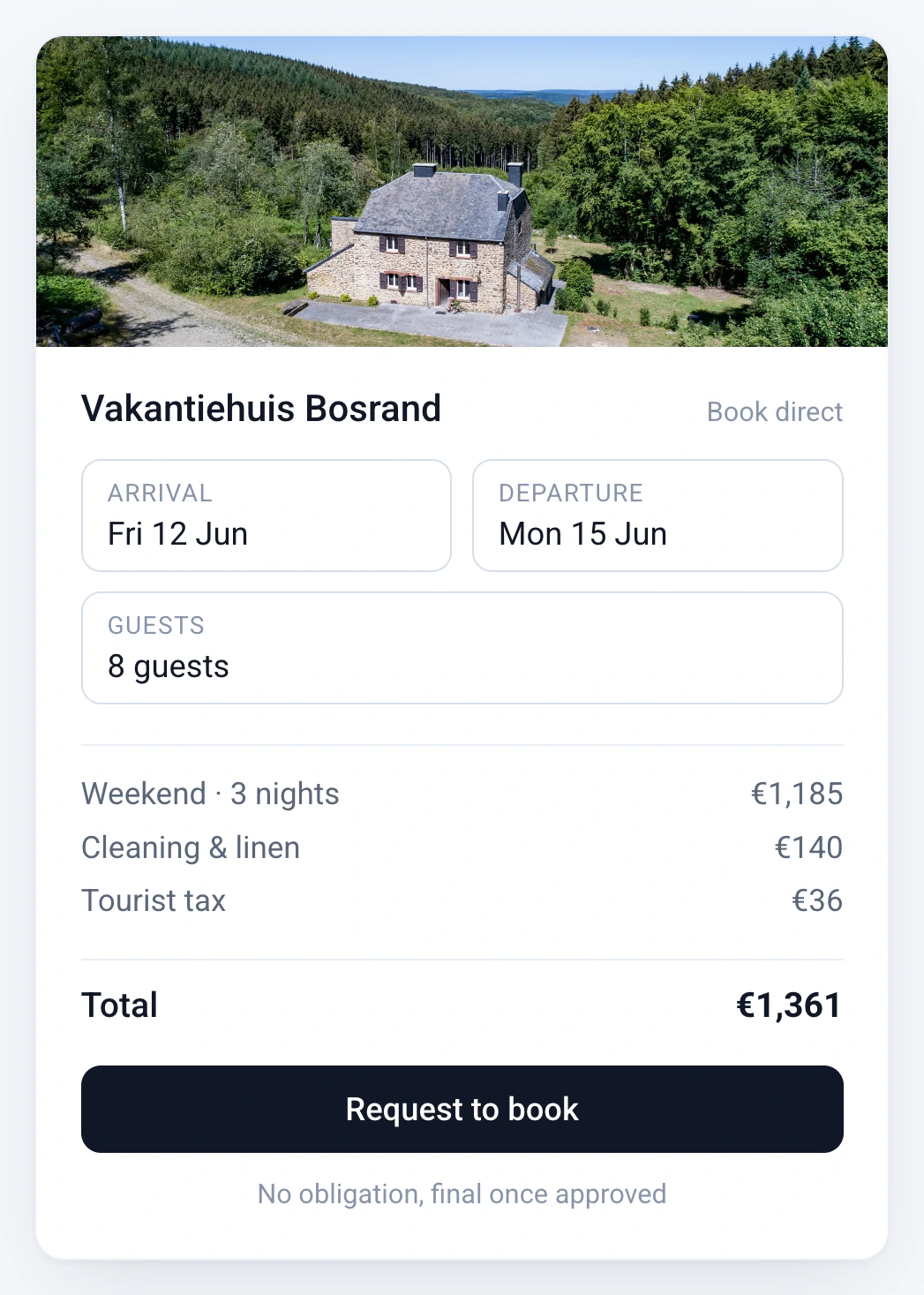
- A live availability calendar and booking form, in your own style: you set the brand colour in the dashboard.
- Two ways to show it: Embed, a booking form inside your page, or Popup, a side drawer that opens from a button.
- Multilingual, and it works on any device.
- Online payments through Stripe or Mollie on Professional and Business: deposit, balance and security deposit, by card or local methods such as iDEAL and Bancontact, depending on what you enable. The money goes to your own account. Stripe or Mollie charge their own transaction rate. On Basic you handle payment with the guest yourself.
- Two-way iCal sync with Airbnb, Booking.com, Vrbo and any platform with an iCal link, on every plan. The channel manager for Airbnb, Booking.com and 60+ channels is on Professional and Business.
- Hosted in the EU and GDPR-compliant. Help in Dutch and English from the people who build it.
Basic is €15 a month billed yearly (€19 monthly), Professional €40 (€49) and Business €80 (€99). One price covers one to five properties. See Bookinghook plans and prices.
Our free availability calendar is different: it only shows which nights are taken. The booking widget lets guests reserve, and pay on Professional and Business. More on the product: direct website booking and the booking engine.
How embedding works in any builder
- Set up your property in Bookinghook: rates, extras and how you want to be paid. About half an hour, and we are happy to help if you have questions.
- Copy the widget code. In the dashboard, open This rental → Widget. In the Embed widget section, choose Embed or Popup, pick a language, and press Copy code. The Go to widget button on the Add reservations page leads to the same place.
- Add a block to your page. In your builder, add an HTML, embed or custom-code block where the calendar should sit.
- Paste the code and publish. Then make a test booking yourself.
- Connect your Airbnb and Booking.com calendars both ways, so a booking on either side closes the dates on the other. Steps: how to sync Airbnb and Booking.com with Bookinghook.
Under How to embed the dashboard offers Script, which we recommend for most sites, and Iframe, for websites that only allow an iframe. If your builder asks for a height, use the same height you entered in the dashboard: 600 to 900 pixels, and 780 fits most pages.
Some builders and plans strip script tags. If the widget stays blank after you publish, switch to Iframe, or put your booking link on a button instead.
Step by step by builder
- WordPress: a Custom HTML block. In Elementor, the HTML widget. Add a booking widget to WordPress.
- Wix: an Embed HTML element. Add a booking calendar to Wix.
- Squarespace: a Code block, with HTML selected.
- Webflow: an Embed element.
- Plain HTML: paste the code where the calendar should appear.
The WordPress and Wix guides have the full click path. Menus change from time to time, so look for the builder's own help if a name differs. The other builders follow the same paste pattern as our free calendar tool.
Bookinghook, Wix Hotels, a WordPress rental theme or Lodgify?
Wix. Wix has its own booking apps in its App Market, such as Wix Hotels by HotelRunner, which manages room types and inventory for hotels, B&Bs and vacation rentals inside Wix. Bookinghook is not a Wix app. You paste embed code, and your rates, calendar sync and payments stay in your Bookinghook dashboard. If you would rather run everything inside Wix, look at its apps first.
WordPress. WP Rentals is a WordPress theme, from WpEstate, that turns a WordPress site into a listing and booking site. That makes sense if you want to build the whole site around it. If your site already looks right, the widget adds bookings, calendar sync and payments without changing it.
Lodgify. Lodgify builds websites and also offers a widget you can paste into an existing one. Choose it if you want its website builder and property management in one. Choose Bookinghook if you want to keep your site and keep things simple. Read Bookinghook vs Lodgify or the comparison with Lodgify and Smoobu.
Source for Wix Hotels, WP Rentals and Lodgify: their own pages, checked on 10 November 2026.
Frequently asked questions
Does Bookinghook work with Wix, WordPress, Squarespace and Webflow?
Yes, wherever your builder lets you add an HTML, embed or custom-code block. Bookinghook is embed code, not a Wix app or a WordPress plugin, so there is nothing to install from an app market.
Will Airbnb and Booking.com stay in sync?
Yes, once you set up two-way calendar sync. Every plan includes iCal sync with Airbnb, Booking.com, Vrbo and any platform with an iCal link. iCal is reliable but not instant. The channel manager on Professional and Business also syncs prices and brings in bookings with guest details.
Do you take a commission?
No. Bookinghook does not add a commission on the booking. With online payments on Professional and Business, guests pay through Stripe or Mollie into your own account, and Stripe or Mollie charge their own transaction rate.
The widget stays blank on my site. What now?
Some builders and plans strip script tags. In the dashboard, switch "How to embed" from Script to Iframe, or put your booking link on a button instead.
Can I try it before I paste anything?
Yes. It is free for 14 days with no setup fee. You can also share your booking link first and add the widget to your site later.
What if I get stuck on the code?
Ask us. We answer in Dutch and English, and we are happy to help you place the code.
Ready to put bookings on the site you already have?
Try Bookinghook free for 14 days, or book a 20-minute call. Unsure about the embed? We are happy to help you place it.